Computing Roughness
In this tutorial we will explain the steps to compute a crystal surface Roughness defined as the ration between the “effective” surface and the “flat” surface.
We will hereby use sucrose as an example. We will analyse (100) and (10-1) crystal faces. Lattice information on sucrose was downloaded from svn://www.crystallography.net/cod/cif/3/50/00/3500015.cif
To this end we will use the following input file which can
be also found under /examples/Roughness:
LCC{
  ClusterType=          Planes
  ClusterNumber=        2
  Verbose=  3
  LatticeBaseFile= "lattice_basis.xyz"
  WriteCml= F
  CheckPeriodicity= T

  ReadLatticeFromFile= F
  TypeOfLattice=        Triclinic
  LatticePoints=        30

  CheckLattice=         T

  PrimitiveFormat=      Angles
  AtomType=             At
  UseLatticeBase=       T
  BaseFormat=           abc
  CutAfterAddingBase=   F

  LatticeConstanta=     7.789
  LatticeConstantb=     8.743
  LatticeConstantc=     10.883

  LatticeAngleAlpha=     90
  LatticeAngleBeta=      102.760
  LatticeAngleGamma=     90
  RCoeff= 0.0

  CenterAtBox=       T
  Reorient=          T

  #+X,+Y,+Z
  #-X,1/2+Y,-Z
  SymmetryOperations= T
  NumberOfOperations= 2
  OptimalTranslations= F
  Translations[
   1  0   1   -1
   0  1   2   0.5
  ]
  Symmetries[
     1  1  1
    -1  1 -1
  ]

  NumberOfPlanes=   6

  ComputeRoughness= T
  RoughnessParameters[
    50.0 1.0 40 80 80
  ]

  Planes[
    1  0   0   2.5
    -1  0  0   1.5
    0  1   0   4.5
    0  -1  0   3.5
    0  0   1   2.5
    0  0   -1   1.5
  ]

  #Planes[
    1  0   -1   2.5
    -1  0  1   1.5
    0 -1   0   4.5
    0  1  0   1.5
    1  0   1   4.5
    -1  0   -1   1.5
  ]

}
The “basis” needs to be provided via the lattice_basis.xyz file. The
content of such file is provided below and can also be found under
/examples/Roughness:
45
#Sucrose basis
O  0.63189     0.34908    0.62279
O  0.7136      0.2018     0.41867
O  0.6440      -0.0665    0.6512
O  0.2978      -0.0008    0.69117
O  0.2529      0.3114     0.77094
O  0.60891     0.40061    0.82857
O  0.68400     0.65323    0.78776
O  0.3785      0.5127     0.97000
O  0.9607      0.5091     0.67341
O  1.0893      0.6500     1.02195
O  0.7957      0.42950    1.07412
C  0.7053      0.1955     0.64075
C  0.5578      0.0769     0.6265
C  0.4362      0.1116     0.71451
C  0.3651      0.2728     0.6871
C  0.5149      0.3897     0.70028
C  0.8157      0.1767     0.5431
C  0.6306      0.5556     0.87572
C  0.8718      0.6862     0.82381
C  0.9441      0.5804     0.93500
C  0.7861      0.5573     0.99233
C  0.4569      0.6161     0.8967
C  0.9532      0.6662     0.7110
H  0.7813      0.1873     0.7252
H  0.4894      0.0781     0.5393
H  0.5018      0.1046     0.8022
H  0.2953      0.2763     0.6004
H  0.4639      0.4900     0.6734
H  0.9127      0.2488     0.5604
H  0.8647      0.0743     0.5487
H  0.733       0.298      0.402
H  0.2287      0.0165     0.7364
H  0.2152      0.3986     0.7560
H  0.8878      0.7925     0.8526
H  0.9806      0.4827     0.9048
H  0.7738      0.6491     1.0414
H  0.4764      0.7140     0.9395
H  0.3769      0.6323     0.8158
H  0.3772      0.4263     0.9405
H  0.8853      0.7242     0.6409
H  1.0716      0.7077     0.7308
H  0.860       0.480      0.654
H  1.185       0.604      1.009
H  0.8058      0.3509     1.0352
H  0.553      -0.128      0.642
The first run we will do needs to have the first plane listed uncommented. Note that the first plane listed will be the one used to compute the roughness. After executing lcc as follows:
lcc_main sucrose.in
We will get information about the surfa areas S1 (effective) and S0 (flat) surface areas, together with their ratios.
The run will also produce a file called mask.xyz which contains
a set of coordinates showing the surface pattern of the crystal
face (vmd -e mystate.vmd).
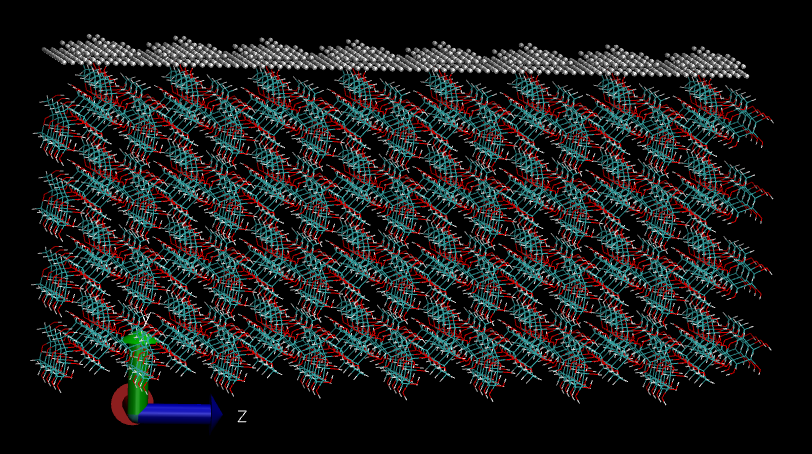
If we now uncomment the second plane (10-1) and rerun we will see the following surface:
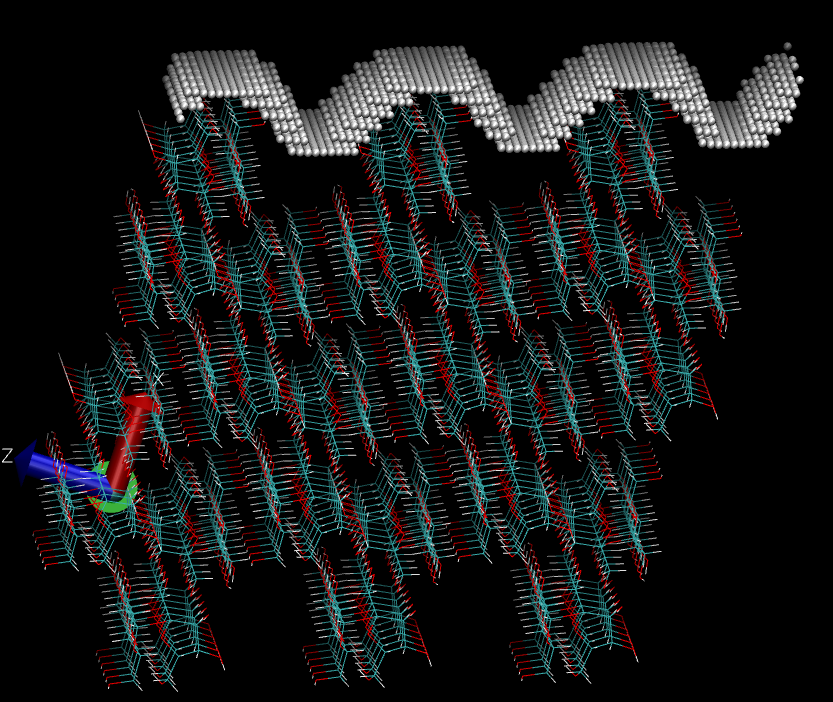
The parameters controlling these computations in the input file are the following:
ComputeRoughness= T
RoughnessParameters[
50.0 1.0 40 80 80
]
The first value controls the isovalue to compute the surface, the second value controls the radius of the “probe sphere” used to construct the surface, the third, fourth and fifth values control the discretization along the a1, a2, and a3 axis respectivelly.