Building/cutting a shape
Growing shapes from a seed file
The Bravais theory says that a crystal face will grow faster is the atom/unit cell that is added to the face finds a higher coordination. In this way, faces that have a high reticular density will grow slower since the adatom will potentially find only a “top” position.
Here we give an example of how to grow a shape from a seed
using only geometrical parameters which are: the MinCoordination
and the RCut. RCut is used as a criterion to search for the
coordination. If the adatom (possible atom to be included in the
shape) has 3 atoms that are within RCut, the coordination of
such an adatom will be 3. If MinCoordination = 2, the the adatom
with coordination = 3 will be included in the shape.
An exaple input file is given as follows:
#Lcc input file.
LCC{
 JobName=                 AgBulk        #Or any other name

 ClusterType=             BravaisGrowth
 NumberOfIterations=      3
 RTol=                    0.01
 MaxCoordination=         1
 RCut=                    3.5
 SeedFile=                "seed.pdb"

 TypeOfLattice=           FCC
 LatticePointsX1=        -8             #Number of point in the direction of the first Lattice Vector
 LatticePointsX2=         8
 LatticePointsY1=        -8
 LatticePointsY2=         8
 LatticePointsZ1=        -8
 LatticePointsZ2=         8
 AtomType=                Ag
 PrimitiveFormat=         Angles        #Will use angles and edges
 LatticeConstanta=        4.08
}
The NumberOfIterations parameter controls the cycles of gorwing that we want. The SeedFile
paramter is the name of the file containg the “seed” from where the shape will grow. For this
particular exaple we will used a seed (seed.pdb) file with the following content”
REMARK                      Seed File
TITLE coords.pdb
CRYST1  137.192  231.464  154.494  90.00 102.65  90.00 P 1           1
MODEL                   1
ATOM      1  Ag  M       1       0.000   0.000   0.000  0.00  0.00          Ag
TER
END
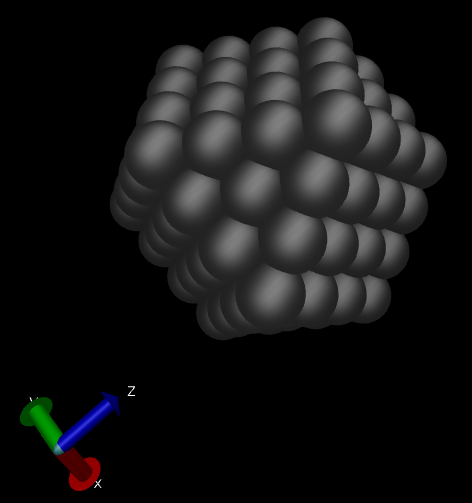
This means that we will be growing from “only one” Ag atom center at the origin. The result is the following shape:
Cutting using planes
A crystal shape can also be cut using planes. This could be usefull to comput a Wulff type of crystal shape by listing the planes and the surface energies or just for creating a “slab” to study a particular surface. An example of cutting by planes is provided as follows:
#Lcc input file.
LCC{
 JobName=                 AgPlanes        #Or any other name
 Verbose=                 3

 TypeOfLattice=           FCC
 LatticePoints=           50             #Number of point in each direction
 LatticeConstanta=        4.08
 AtomType=                Ag

 ClusterType=             Planes

 NumberOfPlanes=   6
 Planes[
  1 0 0 4.1
  -1 0 0 4.1
  0 1 0 4.1
  0 -1 0 4.1
  0 0 -1 4.1
  0 0 1 4.1
]
}
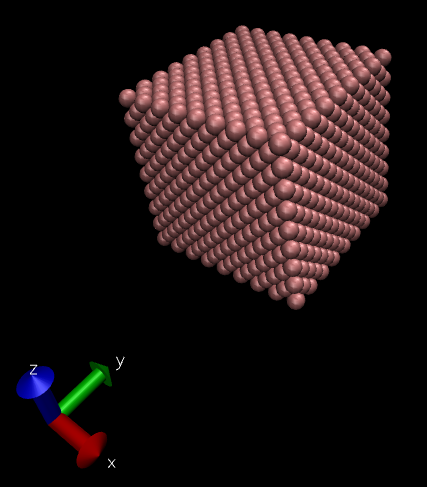
This creates the following cubic shape: